This article explains what Achievement Badges are, how the points and Leaderboard work, and how they help your team get more out of Refari.
What are Achievement Badges?
Achievement Badges are Refari's built-in way of recognising the everyday work that leads to placements. As you post roles, share them, build referrals, set up job alerts and grow your reputation, Refari rewards that activity with badges. Each badge is worth points, and your points add up to a place on your company Leaderboard.
The idea is simple. The activities that earn badges are the same activities that fill your pipeline, so the badges turn good habits into a bit of friendly, visible competition across your team. The right behaviours get noticed, celebrated and repeated.
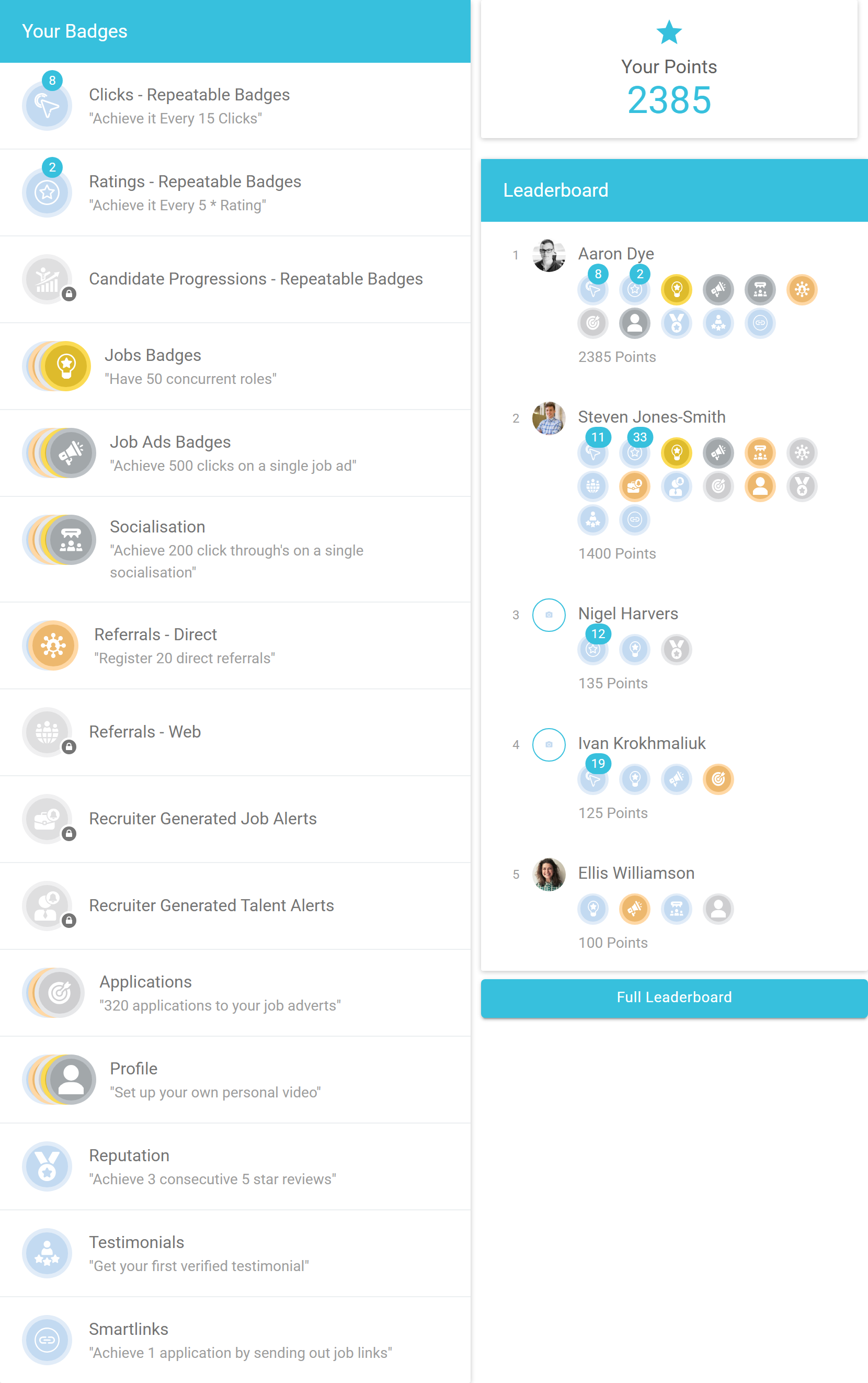
Here is how it all comes together on your own Achievements page, with the badges you have earned, your total points and a snapshot of the Leaderboard:
Note: Achievement Badges are part of every team member's Refari account. Candidates, referrers and hiring managers do not see them. If you cannot see the Achievements menu, it may be switched off for your account, so get in touch with the Refari team and we will sort it out.
Where to find your badges
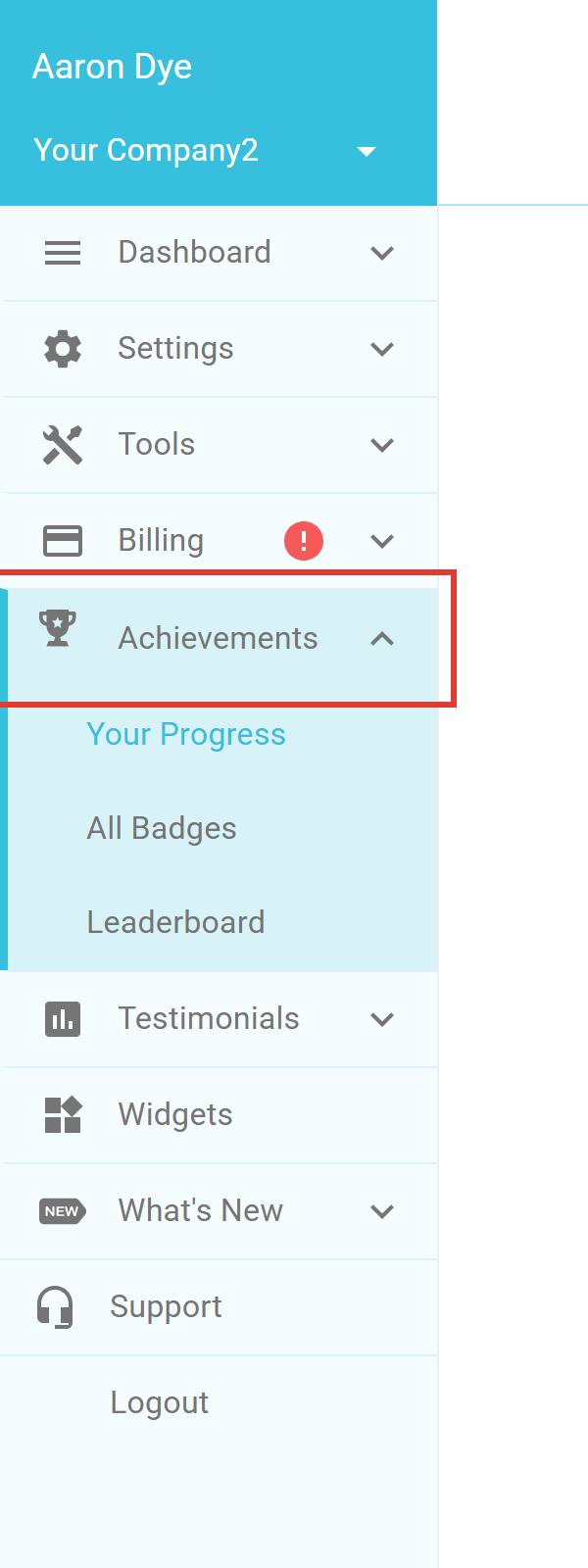
You will find everything under Achievements in the left-hand menu. It has three views:
- Your Progress: the badges you have earned, your total points, and a snapshot of where you sit on the Leaderboard.
- All Badges: every badge category and the levels within it, so you can see what is available and what to aim for next.
- Leaderboard: the full company ranking by points.
How badges and points work
Most categories have five levels, and each level is harder to reach than the last: Tin, Bronze, Silver, Gold and Platinum. The higher the level, the more points it is worth, so reaching the top tiers makes a real difference to your total.
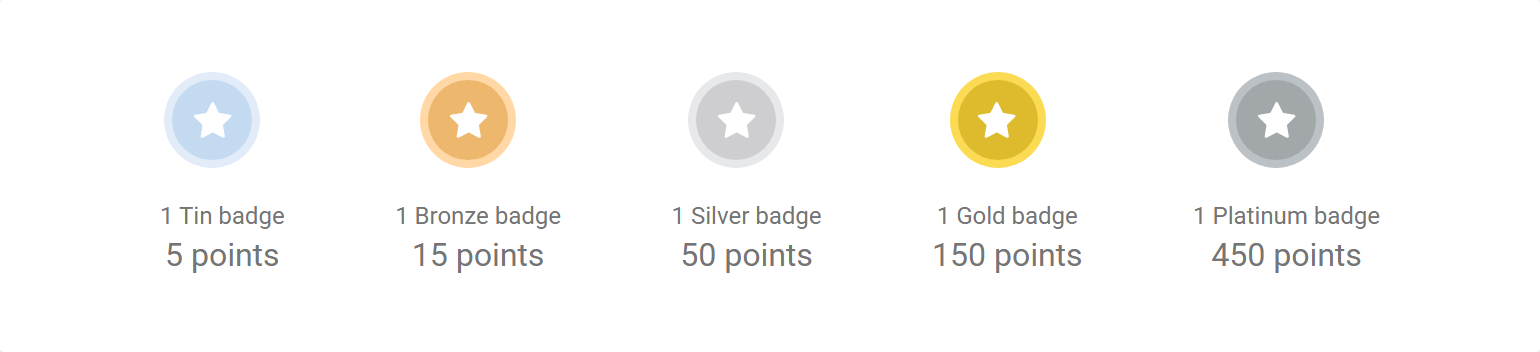
Points are cumulative. When you reach a new level in a category, its points are added to your running total, and that total is what places you on the Leaderboard.
A few categories have repeatable badges ↗. Instead of stopping at Platinum, these keep rewarding you each time you hit the threshold again, for example every set number of clicks or every new five-star rating. They are marked with a small refresh icon.
Idea: Focus on quality, not just volume. A well-timed, genuinely engaging socialisation that drives real click-throughs to your jobs will move you up the Leaderboard faster than lots of low-effort posts. The badges are designed to reward the activity that actually works.
The badge categories
Each category rewards a different type of activity, and every one was chosen because it drives something that helps you make placements. Open All Badges to see them all, each with its own set of five levels and a target to reach.
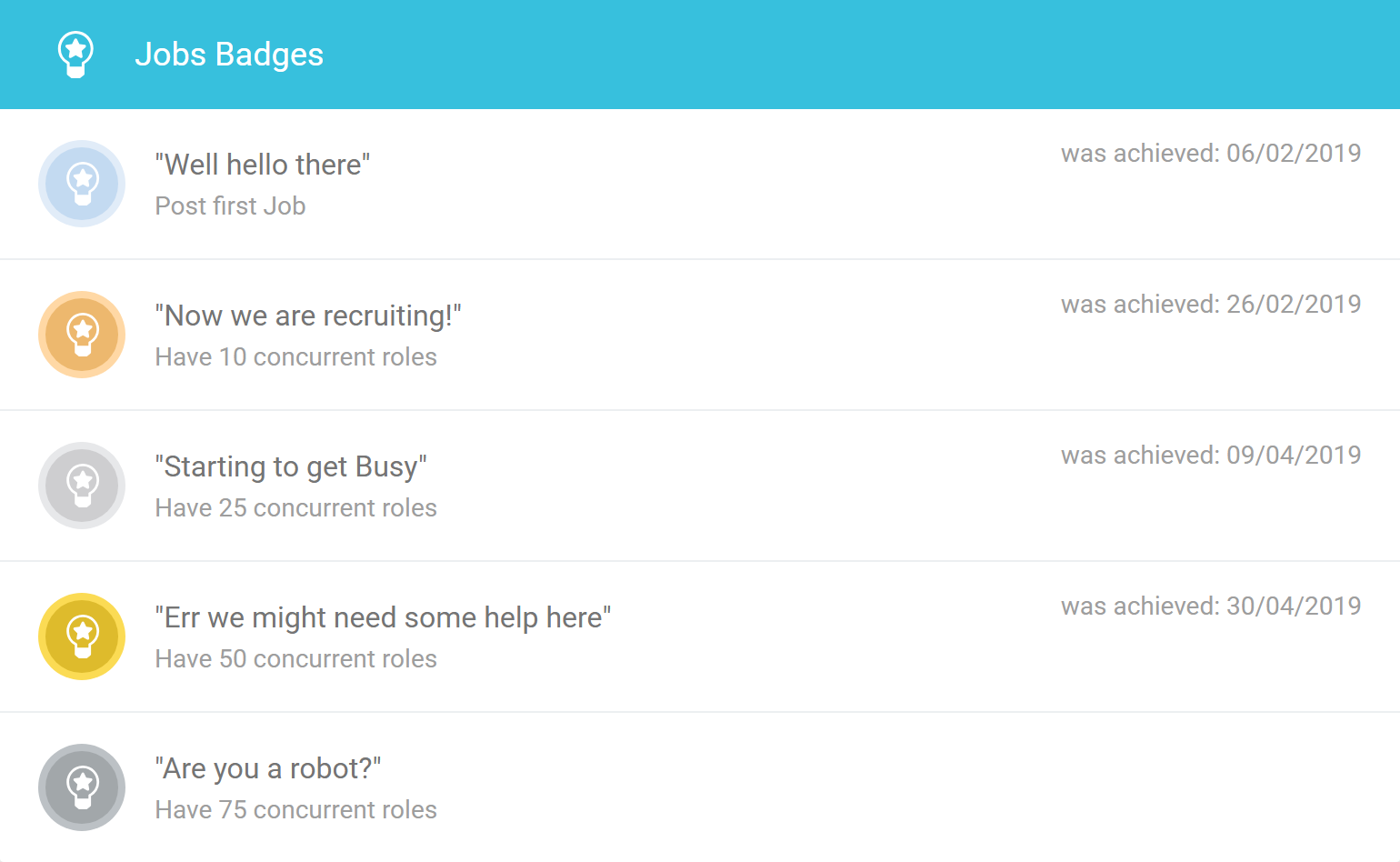
Each category card shows the five levels, what you need to do to earn each one, and the date you achieved it. Here is what every category rewards, and why it helps:
| Category | What it rewards, and why it helps |
|---|---|
| Jobs | Rewards keeping roles live on your board. The more roles you have open, the more options you can offer candidates, and the easier it is to move someone who applied for one role onto another. |
| Job Ads | Rewards job ads that attract clicks. A popular advert puts your role in front of more people, which means more applications and more referrals. |
| Socialisation | Rewards sharing your roles socially in a way that drives real click-throughs to your jobs. That traffic feeds applications, referrals and job-alert sign-ups, so the badges favour quality posts over sheer volume: post something engaging, at the right time, and ask the right people to engage. |
| Referrals - Direct | Rewards logging the candidate referrals you generate yourself. Recording them keeps your referrers engaged and encourages more referrals over time. |
| Referrals - Web | Rewards referrals that come in through your website. These are driven by traffic and by talking about your referral programme, so mention it in your posts, your emails and your signature. |
| Recruiter Generated Job Alerts | Rewards setting up job-alert subscriptions for good candidates. Every subscriber is a warm contact who comes back to your jobs, and it has knock-on effects across many of the other categories. |
| Recruiter Generated Talent Alerts | Rewards setting up talent-alert subscriptions, so the right hiring managers hear about the right candidates. |
| Applications | Rewards attracting applications to your adverts. It is not purely a numbers game: a well-written advert that sells the role, alongside a profile that builds trust, converts far more viewers into applicants. |
| Profile | Rewards completing your profile ↗, including a personal video. A complete, friendly profile reassures candidates about who they are dealing with before they apply. |
| Reputation | Rewards earning consecutive five-star reviews. A strong reputation makes candidates more comfortable putting their next move in your hands. |
| Testimonials | Rewards earning verified testimonials. They are powerful social proof that helps win over both candidates and hiring managers. |
| Smartlinks | Rewards driving applications through the trackable job links (Smartlinks) you share. |
| Clicks (repeatable) | Rewards you again each time the jobs you share reach another milestone of clicks. |
| Ratings (repeatable) | Rewards you again each time you earn another five-star rating. |
| Candidate Progressions (repeatable) | Rewards you again each time you progress another set of candidates. |
The Leaderboard
Your points roll up into a company-wide Leaderboard. It ranks everyone by total points and shows each person's current points, their previous points, how their position has changed, and the badges they have earned. Your own row is highlighted so you can find yourself at a glance.
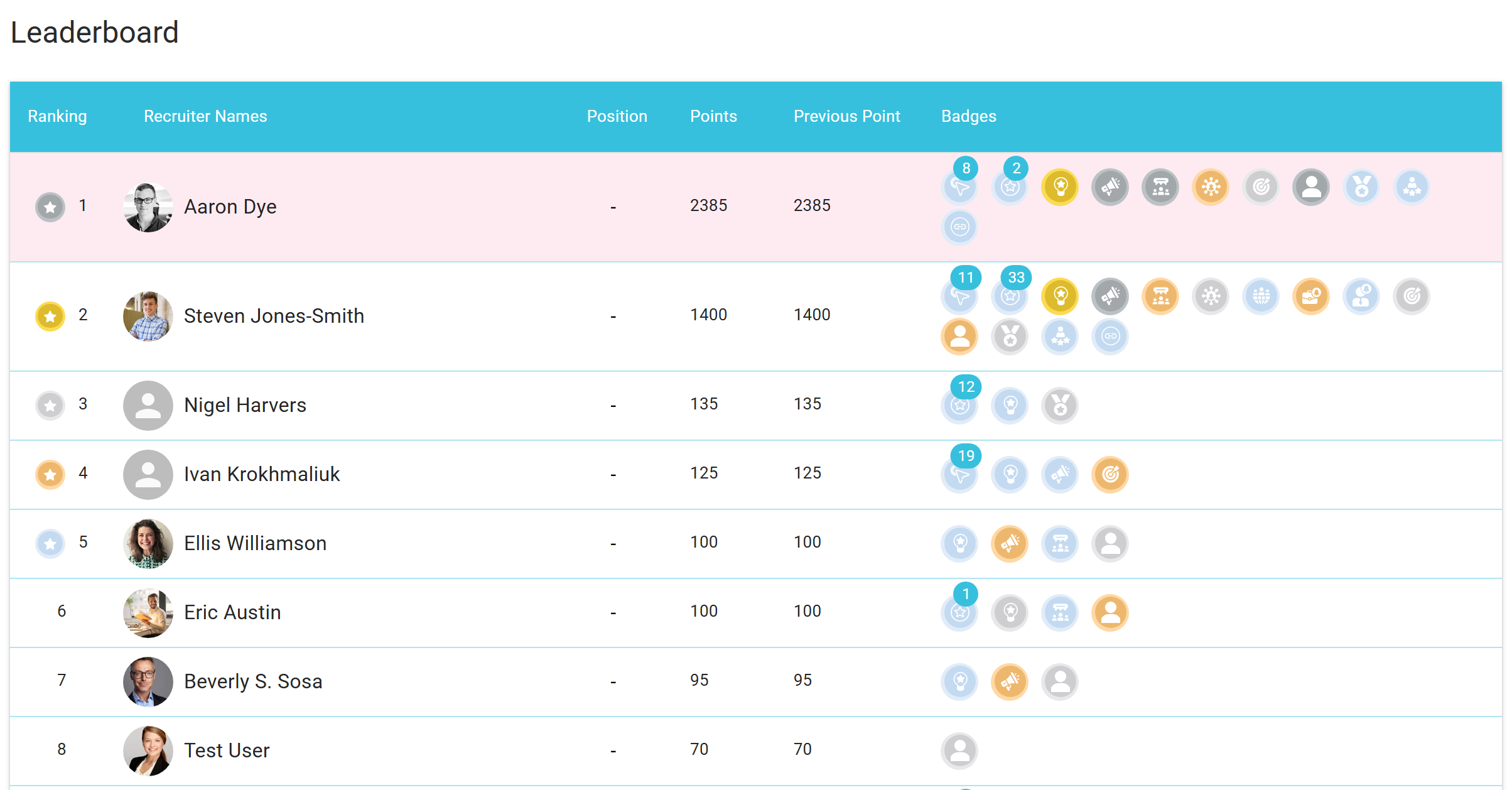
It is a friendly way to see who is driving activity, and a quick way for managers to spot momentum across the team.
Note: Some people need a Refari account but will not be doing recruiter activity, such as a finance manager or a director. So that they are not always shown at the bottom of the table, an administrator can opt them out of the Leaderboard. They are then left out of the Leaderboard and the email updates below, and their access to Refari is unaffected.
Get updates by email
You do not have to log in to keep up with your badges. Once a month, Refari emails team members a recap of the badges you and your colleagues earned that month, along with the current Leaderboard and where you sit on it, with a link straight to your progress.
Admins and managers also receive Refari Insights emails. These celebrate the period's Top Recruiter and highlight who is leading on activity such as website clicks, ratings and candidate progressions, alongside how the team's numbers are trending. Insights are sent weekly, monthly and quarterly, so there is always a fresh reason to keep the activity up.
How Achievement Badges help you get more from Refari
Badges are not just a bit of fun. They quietly point everyone towards the habits that build a healthy pipeline: more live roles, better job ads, smarter social sharing, more referrals, more job-alert sign-ups and a stronger profile and reputation. Because that activity is exactly what leads to placements, climbing the Leaderboard and making more placements tend to go hand in hand.
For managers, the Leaderboard is a simple, real-time view of who is active and where the momentum is, which makes it easy to celebrate good work and to spot where a bit of coaching would help.
Other articles you might be interested in: Repeatable Badges - What are they? | How to opt users out of Gamification
Was this article helpful?
That’s Great!
Thank you for your feedback
Sorry! We couldn't be helpful
Thank you for your feedback
Feedback sent
We appreciate your effort and will try to fix the article