This guide walks you through adding a new candidate by uploading their CV. Refari reads the CV and automatically fills in the candidate's details for you, so you do not have to type them in by hand. This is called resume parsing.
Note: Resume parsing is an AI-powered feature, so it draws on your account's AI budget and is available when AI is enabled for your company.Step 1: Open the Add candidate window
Go to the Candidates page in your dashboard and click Add candidate. The Add New Candidate window opens with a CV upload area at the top.
Note: The Add candidate button is available when you manage candidates directly in Refari. If you do not see it, your candidates are syncing in from your connected ATS, so you will add and update them there instead.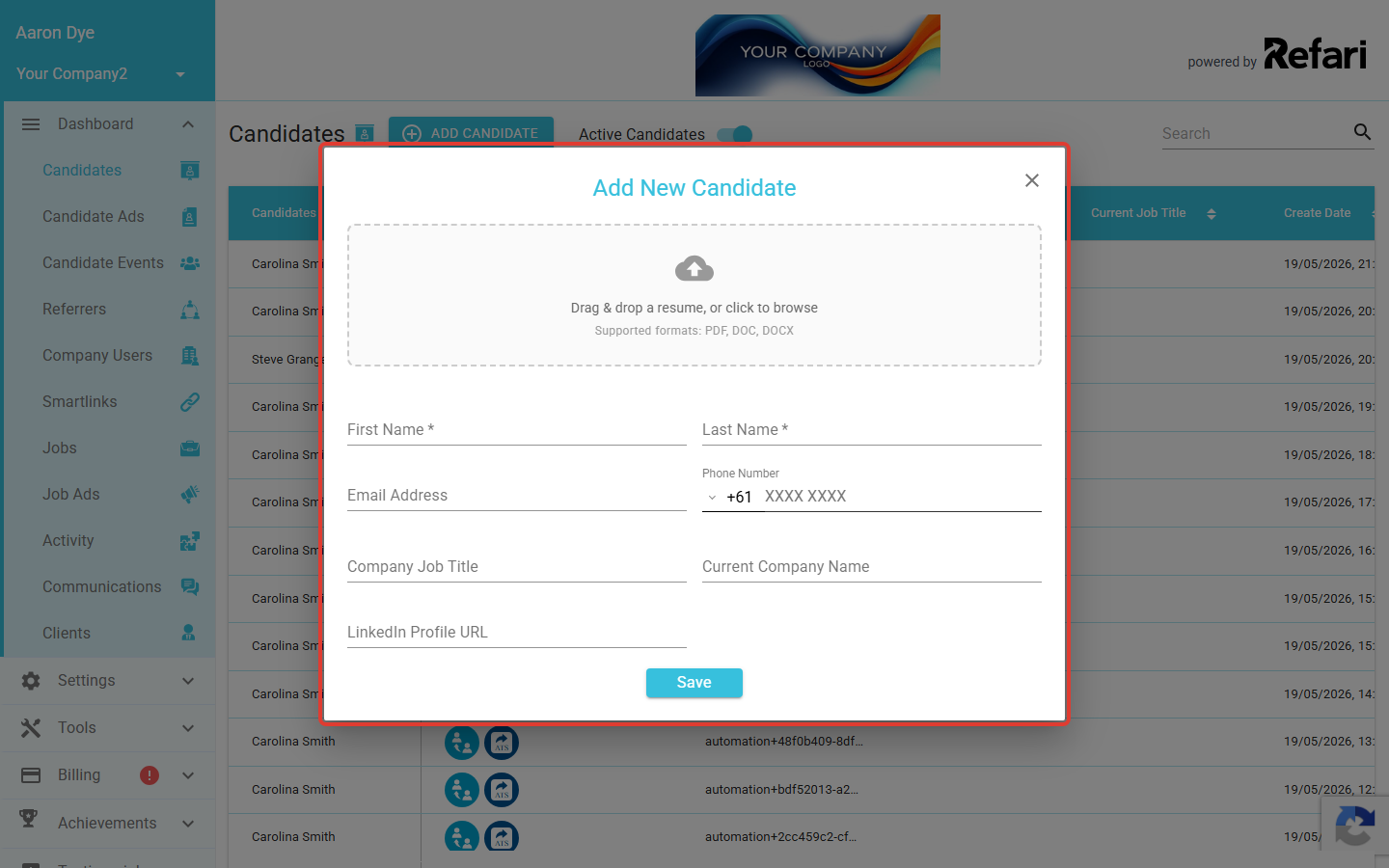
Step 2: Upload the CV
In the upload area (labelled Drag & drop a resume, or click to browse), either drag the candidate's CV onto it or click to browse and choose the file from your computer. You can upload one file at a time, in PDF, DOC, or DOCX format.
Idea: Grabbed the wrong file? Click the X next to the uploaded file name to remove it, then upload the correct CV.Step 3: Let Refari read the CV
Refari uploads the file and reads it. While it works, you will see a Parsing resume... message. This usually takes a few moments.
Step 4: Review the details Refari filled in
Once parsing finishes, Refari fills in the candidate form with the information it found. Where the detail is available on the CV, it populates:
- First Name and Last Name
- Email Address
- Phone Number
- Company Job Title
- Current Company Name
- LinkedIn Profile URL
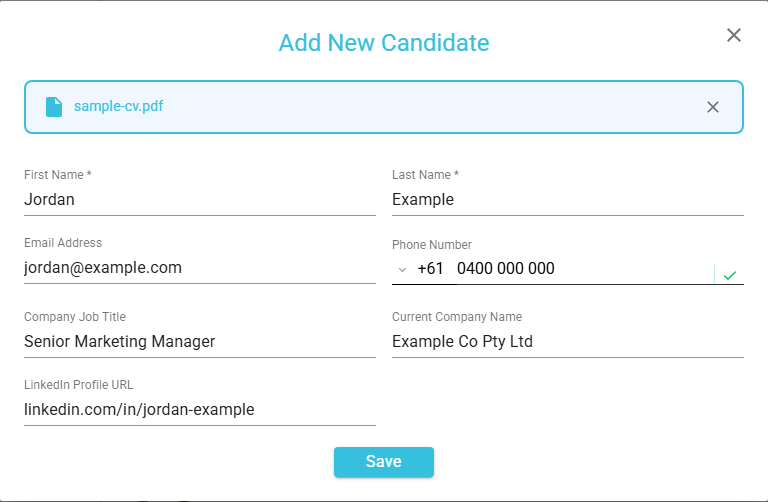
Note: Always check the details before saving. AI reads the CV automatically and occasionally misreads something, such as picking up a previous employer as the current company, so a quick review keeps your records accurate.Step 5: Save the candidate
When you are happy with the details, save the candidate as you normally would. They are added to your candidates with all the parsed details already in place.
Done: Your candidate is added with their name, contact details, and current role filled in from the CV, saving you from typing it all out.Final Notes
Resume parsing is there to save you time on data entry, not to replace your judgement. Upload the CV, let Refari do the typing, give the details a quick check, and save. If a CV will not upload, make sure it is a PDF, DOC, or DOCX file.
Other articles you might be interested in: How to create a Candidate Advert using AI (Beta Mode) | Understanding File Size Limitations for Applications, Registrations, and Other Attachments
Was this article helpful?
That’s Great!
Thank you for your feedback
Sorry! We couldn't be helpful
Thank you for your feedback
Feedback sent
We appreciate your effort and will try to fix the article