This article explains every control on the Referral Settings tab of your Company Settings, so you can set up your referral rewards with confidence. A referral is when someone recommends a person they know for one of your roles, and a referrer is the person who makes that recommendation. The settings here decide how much each referrer is rewarded, how those rewards are calculated, and when referrers hear back about the people they have introduced.
You will find these settings under Settings > Company Settings > Referral Settings. The tab is split into up to three sections: Candidate Referral Reward, Internal Referral Reward (only shown if your internal job board is enabled) and Client Referral Settings.
Note: A few things apply to the whole tab. Only a Company Admin can edit these settings: a Company Manager can open the tab and read every value but each field is greyed out, and other team members do not see the tab at all. Nothing is saved until you click Apply Changes in the bar that appears at the bottom of the page (use Revert to undo unsaved changes). Finally, these fields set the reward amounts and the rules behind your scheme; they are values rather than on/off display toggles. The amount you set does appear to candidates and referrers, which the last section below covers.Candidate Referral Reward
This section sets the reward offered for referring a candidate to your externally advertised jobs (the roles on your public job board and widgets). It is the part most teams set up first.
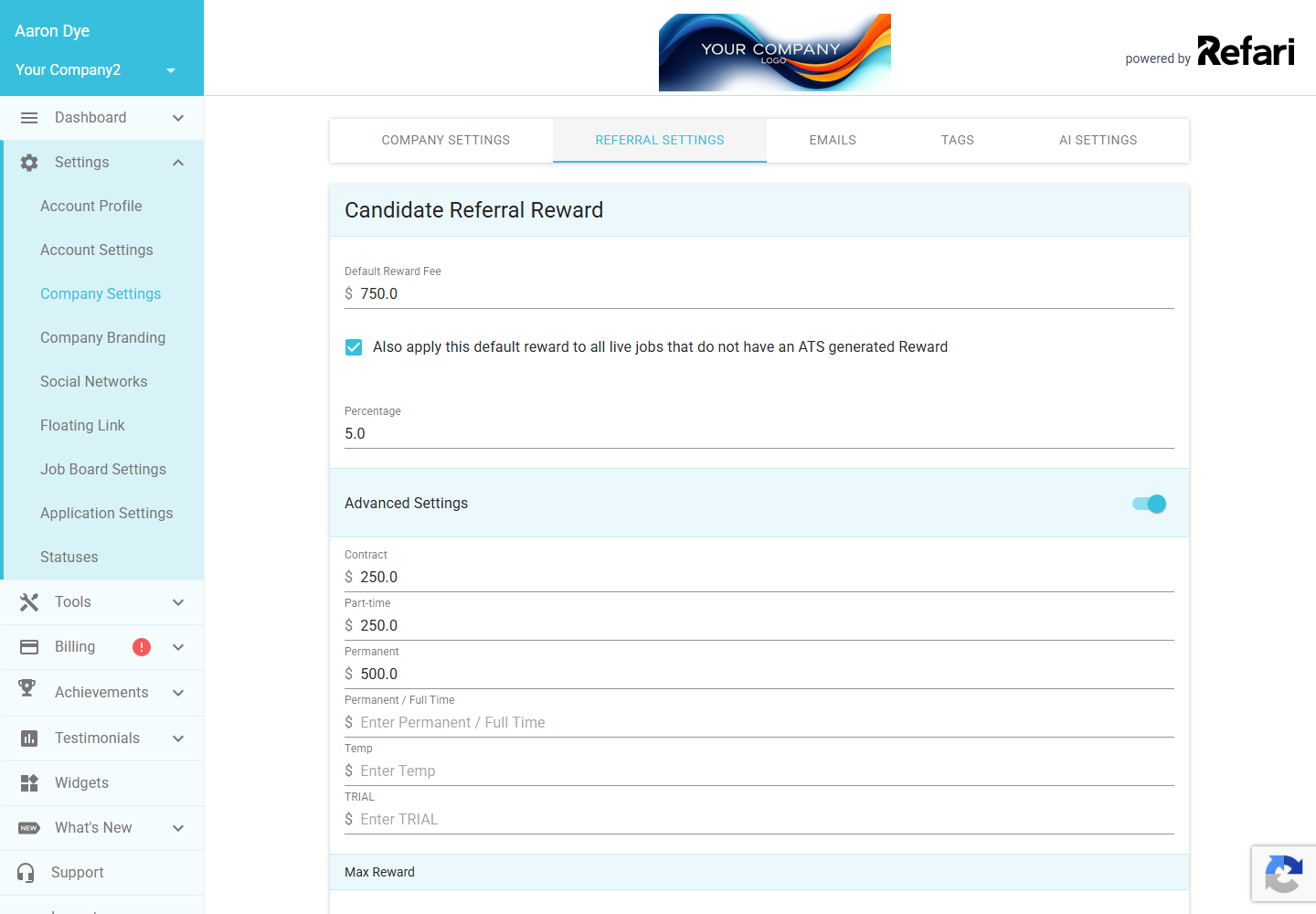
Default Reward Fee
This is the flat cash reward offered for referring a candidate. It fills in a reward for any live job that does not already carry its own reward pulled in from your ATS. The amount shows in your company's default currency, and it is the figure a referrer sees on jobs that use the default. If you leave it blank, it saves as zero.
This default is just a starting point: you can also set or change the reward on a single job whenever you like, which overrides the default for that one role without affecting the rest. To do that on a job-by-job basis, see How to change a Job's Reward Fee ↗.
Also apply this default reward to all live jobs that do not have an ATS generated Reward
This checkbox is a one-off back-fill switch. When you tick it and save, your Default Reward Fee is pushed onto every job that is currently live and does not already have a reward generated from your ATS (jobs that arrived with their own reward keep it). Leave it unticked and the default simply applies to new jobs as they appear, without touching the ones already on your board.
Percentage
If you would rather express the reward as a percentage (for example a share of the placement fee) instead of, or alongside, a flat cash figure, enter it here. Leave it blank to use the cash Default Reward Fee on its own.
Advanced Settings (rewards per work type)
Switch Advanced Settings on to set a different referral reward for each type of work, rather than a single default for everything. When the toggle is on, a row of cash fields appears, one per work type returned for your account (for example Contract, Part-time and Permanent). Each job then uses the reward that matches its work type. Switch the toggle off and those per-type fields are hidden, and only the single Default Reward Fee is used.
Max Reward
This sets an upper limit on the candidate referral reward. It is most useful when you reward by percentage: it caps the calculated figure so a single high-value placement cannot push the reward beyond a ceiling you are comfortable with. Leave it at zero for no cap.
Referral Transparency Triggers
This button opens the transparency triggers window: the mapping of your own ATS or CRM statuses onto Refari's referral stages, which decides when each referral update email is sent to the referrer. Refari uses a fixed set of stages (Viewed, Interviewed, Offered/Reference Checking and Placed), and for each one you tick which of your real ATS statuses count as having reached it. When a referred candidate hits a mapped status, Refari sends the referrer the update email for that stage, so they can follow their referral's progress without anyone having to chase you.
Idea: Each status can be mapped to only one stage, so you cannot accidentally fire two update emails for the same step. Click the small info icon next to a stage to preview the exact email a referrer receives at that point.Internal Referral Reward
This middle section only appears if your internal job board is enabled. If you do not see it, your account does not use the internal board and you can skip ahead to Client Referral Settings.
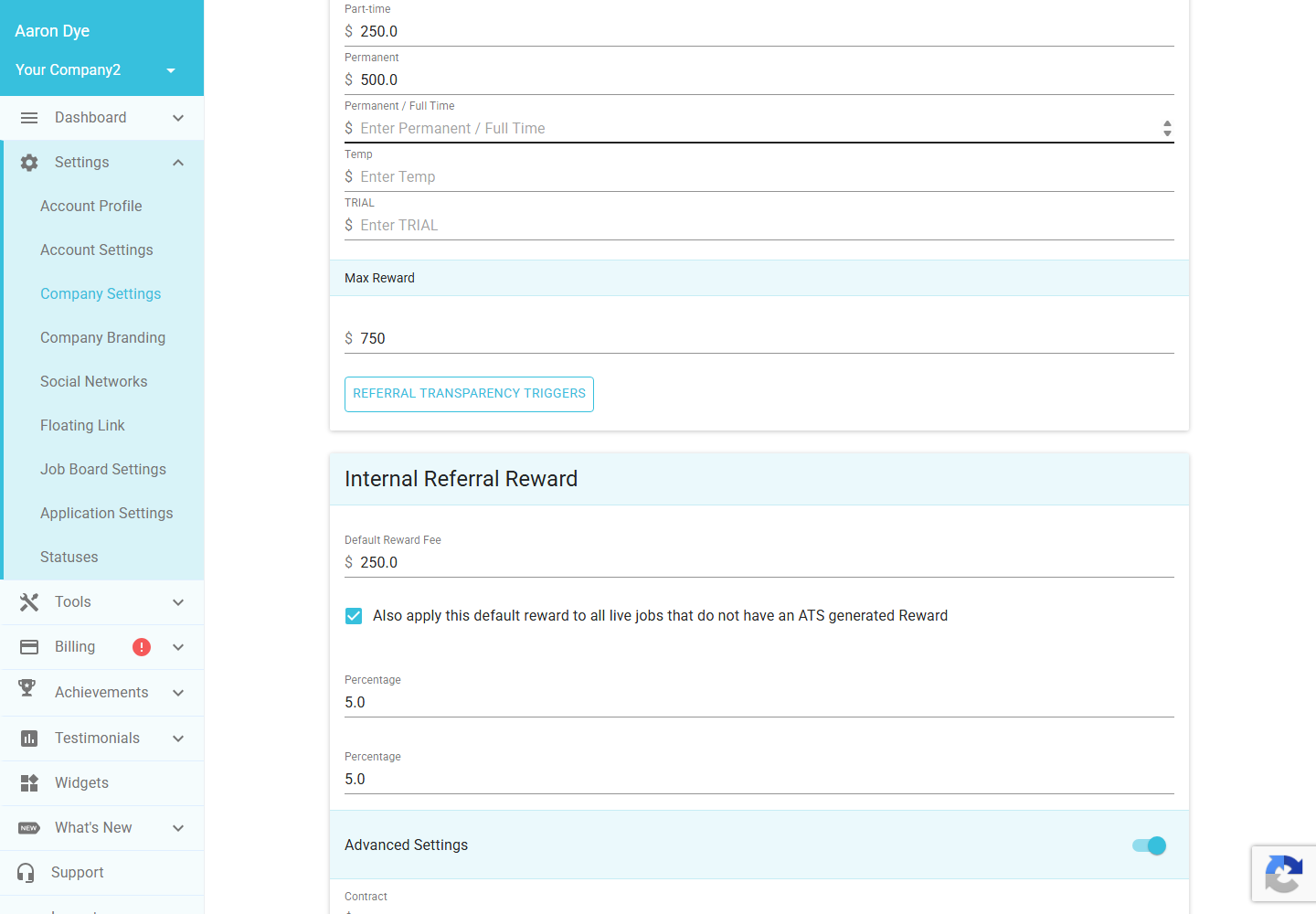
It mirrors the Candidate Referral Reward section above, but for referrals on your internal jobs (the roles you post to your own people rather than advertise publicly). It has its own Default Reward Fee, the same back-fill checkbox, a Percentage field, the Advanced Settings toggle for per-work-type rewards, and a Max Reward cap, all kept separate from the candidate figures so your internal scheme can pay differently from your external one. Internal referrals reuse the same transparency triggers you set up for candidate referrals, so there is no separate triggers button here.
Client Referral Settings
This section is for Client Referrals, which is a different scheme: instead of recommending a candidate, a referrer introduces a new client (a company that could become a piece of business for you). The settings here decide how that introduction is rewarded and how long the introduced client stays credited to the referrer.
Client Ownership Period
This is the candidate ownership period applied to introduced clients: the window during which a referred client stays credited to the referrer. If a placement or deal comes from that client within the window, the referrer still earns their client referral reward. You can choose 6, 12, 18, 24 or 36 months, and it defaults to 12 months.
Client Referral Reward Type
This sets how the reward is calculated. Choose Per Placement to reward the referrer for each placement that results from the introduced client, or Flat Fee to pay a single reward for the introduction itself. It defaults to Per Placement.
Client Referral Reward Fee
This is the cash amount of the client referral reward. It is the figure a client referrer is shown as the promised reward for a successful introduction.
Client Referral Reward Currency
This lets the client referral reward use a different currency from your company default. Leave it on Use agency default and the reward follows your usual currency: pick a specific currency and the reward fee above is shown in that one instead, which is handy if you reward client introductions in a particular market.
Client Referral Reward Percentage
As with candidate rewards, you can express the client referral reward as a percentage instead of, or alongside, the flat fee. Leave it blank to use the cash reward fee on its own.
Client Referral Transparency Triggers
This works just like the candidate triggers, but for client referrals. It maps your own ATS or CRM statuses onto Refari's client referral stages (Interviewed, Offered/Reference Checking and Placed, with no Viewed stage for clients), and decides when each update email is sent to the person who made the introduction. To understand how the wider scheme fits together, see Candidate referrals on Refari: a complete guide for recruitment agencies ↗.
Where your referral rewards appear
Setting the amounts is only half the picture, so it is worth knowing where a candidate or referrer actually sees the reward you have configured. The main place is your public job board: the reward is printed on each job card and on the job detail page, for example "Referral reward: $750 AUD".
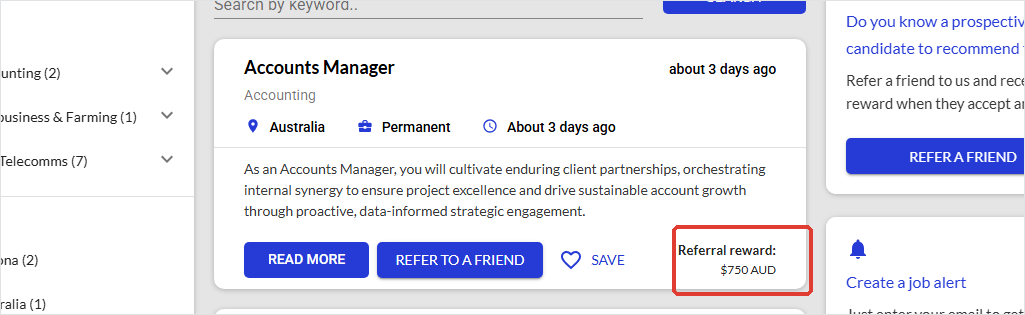
The same figure travels with the role wherever a referrer meets it. It also appears in the Refer a friend window when someone goes to refer that job, and in the job alert emails Refari sends out, so a referrer always knows what is on offer before they recommend someone.
Note: All of these displays are controlled by one switch, Show Reward on Widget, on the Company Settings tab, and a reward only ever shows on jobs that actually carry one. So if your amounts are set but no reward is showing, check both that the job has a reward against it and that Show Reward on Widget is turned on. That setting (and the other display options) are covered in Every setting on the Company Settings tab explained.Final Notes
Remember that none of these changes take effect until you click Apply Changes, and that you can set rewards as a flat fee, a percentage, or both, with the Max Reward cap keeping percentage rewards in check. If you only ever run candidate referrals, you can safely leave the Client Referral Settings on their defaults. When you are happy with your figures, set up your transparency triggers so referrers are kept in the loop automatically.
Other articles you might be interested in: A guide to your Company Settings | Setting up your referral scheme in Refari
Was this article helpful?
That’s Great!
Thank you for your feedback
Sorry! We couldn't be helpful
Thank you for your feedback
Feedback sent
We appreciate your effort and will try to fix the article