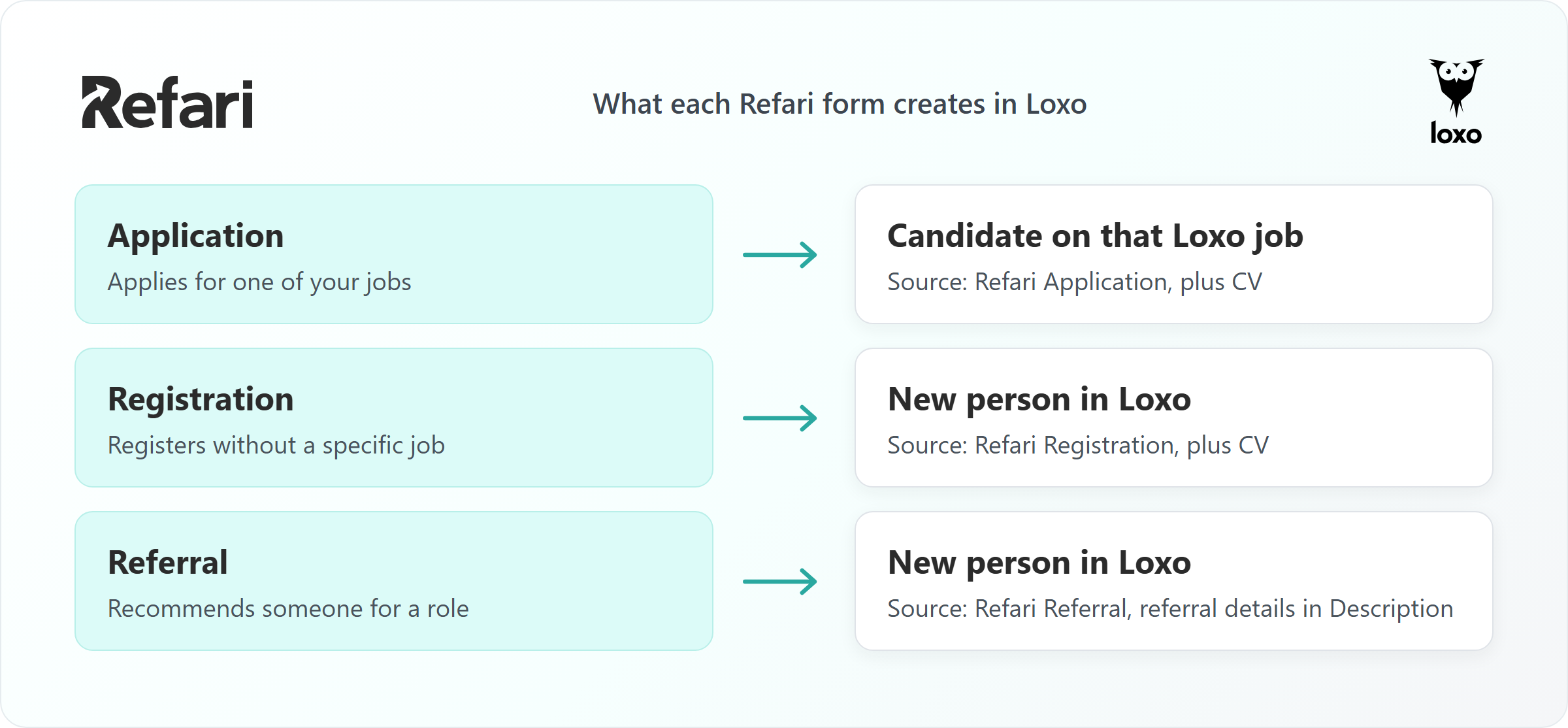
When someone applies for a job through your Refari job board, the application is added to that job in Loxo with their CV and the source Refari Application. A registration creates a new person in Loxo with the source Refari Registration, and a referral creates a new person with the source Refari Referral and the referral details in their description. Everything is sent the moment the person submits the form.
This article explains exactly what Refari writes into Loxo for each form, where your team will find each record, and how candidate stage changes in Loxo flow back to Refari.
It assumes Loxo is already connected and your jobs are appearing on your job board. For the setup itself, see How to connect Loxo to Refari ↗.
What to look for in Loxo
Your job board is the careers page on your website where people view and apply for your jobs. A registration is when someone sends you their details without applying for a particular job. A referral is a recommendation: someone tells you about a person who could suit one of your roles. The person making that recommendation is the referrer.
| Refari activity | What appears in Loxo | What you need to do |
|---|---|---|
| Application | A candidate on the matching Loxo job, with their CV and contact details. Source: Refari Application. | Open the job's pipeline in Loxo and review the new candidate. |
| Registration | A person in Loxo with their details, CV and message. Source: Refari Registration. | Find the person by email and follow your normal registration process. |
| Referral | A person in Loxo for the referred candidate, with the referral details in their description. Source: Refari Referral. | Find the person by email, read the description, and manage the referral reward in Refari. |
Idea: Filter or search by source in Loxo to see everything that arrived from your website. The three Refari source types are created for you when Loxo is connected, so you never need to set them up.Applications from your Refari job board
An application is sent to the Loxo job it was made against, using Loxo's own job application process. Refari sends:
- The candidate's name, email address and phone number.
- Their LinkedIn profile, when they supplied one.
- Their CV, uploaded as the person's resume.
- The source Refari Application.
Loxo adds the candidate to that job's pipeline, normally at the first stage of the job's workflow (Applied, in Loxo's standard workflow). Your team can then move them through the stages as usual.
Two optional extras are added to the person record once the application is in:
- Cover letter file: attached to the person as a document.
- Cover note (text typed into the form): added to the end of the person's description, starting with Cover note for application on YYYY-MM-DD followed by their text. Anything already in the description is kept.
Note: If a Loxo job is set to require a resume and the candidate applies without a CV, Loxo refuses the application. It stays safely in Refari but does not reach Loxo. To avoid this, make sure your Refari application form asks for a CV for those jobs. Once the cause is fixed, you can send it again from the candidate event in Refari.To push a missed application again, follow How to Re-send Applications or Registrations to Your Applicant Tracking System ↗.
Candidate registrations
A registration creates a person in Loxo. It is not attached to any job, so look for it in your people records rather than in a job pipeline. Refari sends:
- Name and email address, plus phone, current job title, current company and LinkedIn profile when supplied.
- City and country, when supplied.
- Their CV, attached as the person's resume.
- Their message, placed in the person's description.
- Any skills they selected, added as tags on the person.
- The source Refari Registration.
Candidate referrals
A referral creates a person in Loxo for the referred candidate, with the source Refari Referral. Refari sends their name, email address, phone, current job title, current company, LinkedIn profile and CV when supplied.
The referral details are written into the person's description as labelled lines, when the information is available:
- Referral from: the referrer's name and email address.
- Message: the referrer's message about the candidate.
- Job: the job title and the Refari job ID it was referred for.
- Ownership Expiration: the date and time the candidate ownership period ends.
The candidate ownership period is the length of time a referral stays credited to the referrer. It is explained in full in What is candidate ownership period for referrals and how does it work? ↗.
Note: A referral is not added to the job's pipeline in Loxo, even when it was made for a specific job. The job appears in the description as context. Find the person by email, read the description, and add them to the job yourself when you are ready to approach them.Referral attribution and rewards stay in Refari. Loxo receives the person and the context your recruiters need, while Refari keeps track of who referred whom and any reward owed. The wider picture is in Candidate referrals on Refari: a complete guide ↗.
People who are already in Loxo
Refari does not search Loxo for an existing person before sending. Registrations and referrals are sent to Loxo as new person records, and applications go through Loxo's own job application process. If the person was already in Loxo, check whether you now have a second record for them and merge the two in Loxo if needed.
Idea: Search Loxo by the email address the person submitted. It is the detail Refari always sends, so it is the quickest way to find a new record and spot a possible duplicate.Stage updates from Loxo back to Refari
When you move a candidate to a new workflow stage in Loxo, Loxo tells Refari straight away. Refari waits about 5 minutes (so that quick clicks through several stages settle), reads the candidate's current stage, and records that stage name as the application's status in Refari. Allow about 5 to 7 minutes for a change to show. If the stage has not changed, Refari leaves the status as it is.
These stages also drive automation in Refari. For example, moving a candidate to Hired can trigger a testimonial and Google review request, as described in How to automatically request Google reviews when you place a candidate in Loxo ↗.
Test the candidate flow
- Choose a published, active job that is visible on your Refari job board.
- Apply with a CV using a personal email address that is not already in Loxo.
- In Loxo, open that job's pipeline and confirm the candidate is there with the CV and the source Refari Application.
- Move the candidate to another workflow stage, then allow about 5 to 7 minutes and check the application's status in Refari.
- If you use registration or referral forms, test each with a different personal email address.
Note: Do not test with a recruiter's work email address. It may already belong to a Loxo user or person, which makes a healthy connection look broken. Use a personal address, and a different one for each test.Frequently asked questions
Where do Refari applications appear in Loxo?
On the Loxo job the candidate applied for, in that job's pipeline, normally at the first workflow stage. The person record shows the source Refari Application and holds their CV.
What source do Refari candidates get in Loxo?
Refari Application for applications, Refari Registration for registrations and Refari Referral for referrals. Refari creates these source types in Loxo for you.
Do referred candidates get added to the Loxo job?
No. A referral creates a person in Loxo with the referrer, message, job and ownership expiry in the description. Your team decides when to add them to a job.
Can I see who made a referral in Loxo?
Yes. The person's description starts with Referral from, followed by the referrer's name and email address. Rewards and attribution are managed in Refari.
How quickly do stage changes in Loxo reach Refari?
About 5 to 7 minutes after you move the candidate.
Final Notes
Use Loxo for your recruitment work and workflow stages, and Refari for the original submission, referral attribution and rewards. If something does not look right, raise a ticket through support.refari.co and include the candidate's email address, the job, the form they used, and roughly when they submitted it.
Refari is a recruitment marketing platform that adds a job board, job alerts, candidate referrals and testimonials to your website, connected to your ATS. Not a Refari customer yet? Book a demo at refari.co.
Other articles you might be interested in: How to connect Loxo to Refari | How to automatically request Google reviews when you place a candidate in Loxo | Candidate referrals on Refari: a complete guide
Was this article helpful?
That’s Great!
Thank you for your feedback
Sorry! We couldn't be helpful
Thank you for your feedback
Feedback sent
We appreciate your effort and will try to fix the article