To connect Loxo to Refari, you paste three things from Loxo (your API key, your Loxo domain and your agency slug) into a secure connection link that Refari Support sends you. Refari then sets up everything else in Loxo for you: the webhooks that tell Refari when a job changes, the candidate source types, and your workflow stages. Your published, active Loxo jobs appear on your Refari job board, and every application, registration and referral goes back into Loxo.
This guide walks you through the setup, what Refari creates in Loxo, which Loxo jobs are imported, how quickly each change syncs, what goes back to Loxo, and how to disconnect.
What the Loxo integration does
Loxo is your applicant tracking system (ATS), the system where you manage jobs, people and candidate pipelines. Your job board is the careers page on your website where anyone can browse and apply for your advertised roles. The integration keeps Loxo as the place you work, and makes your job board, job alerts and referral forms run from what is in Loxo.
| Information | Direction | Timing |
|---|---|---|
| Jobs (new, edited, closed or deleted) | Loxo to Refari | Pushed by Loxo webhook as soon as you save, so usually within a few minutes |
| Loxo users (shown as recruiters on your adverts) | Loxo to Refari | When you connect, then every 3 hours |
| Applications, registrations and referrals | Refari to Loxo | Sent when the person submits the form |
| Candidate workflow stage changes | Loxo to Refari | Processed about 5 to 7 minutes after the change |
Note: You do not need to create webhooks, source types or a second copy of each job in Refari. Refari sets these up for you when you connect, and you keep working in Loxo.Before you start
- A Loxo login that can open Settings and create an API key.
- The Refari connection link sent to you by Refari Support. If you do not have one, or it has expired, ask Refari Support for a new link.
- Ten minutes. Once you open the Loxo form from the link, complete it within 20 minutes or the page will ask you to start again.
How to connect Loxo to Refari
Step 1: Find your Loxo API key, domain and agency slug
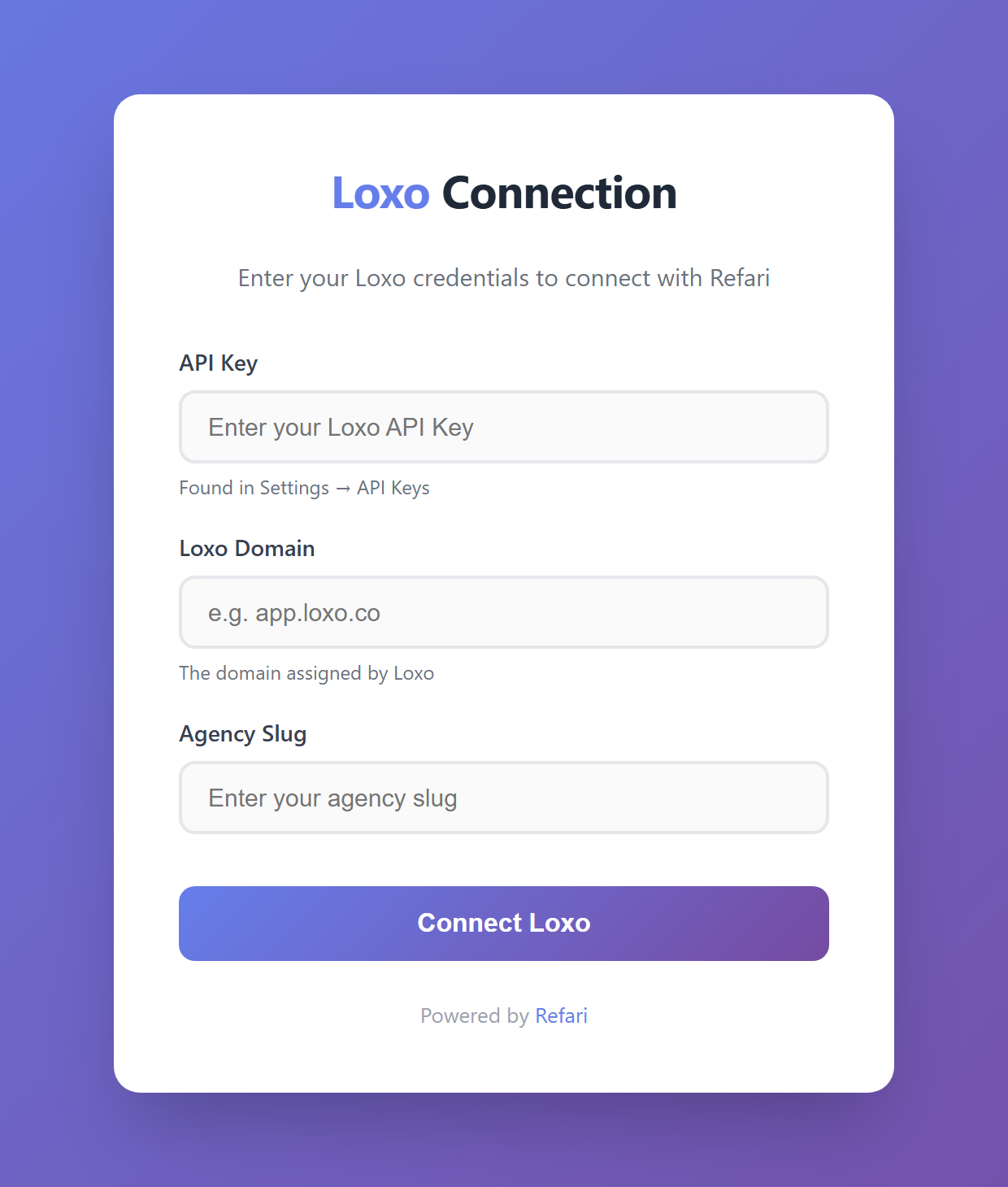
- API key: in Loxo, open Settings > API Keys and copy a key for Refari. An API key is a secure credential that lets Refari read your jobs and write candidates back to Loxo. Treat it like a password.
- Loxo domain: the web address Loxo assigned to your account, without https://, for example app.loxo.co. Some accounts use a longer address such as a pod name in front of app.loxo.co, so copy it exactly from your browser's address bar when you are signed in to Loxo.
- Agency slug: your account's short identifier in Loxo. It is the part of your Loxo web address straight after the domain.
Step 2: Paste them into the Refari connection page
- Open the Refari connection link.
- Choose Loxo if the page asks for your ATS, and agree to the Refari Terms of Use.
- Paste your API key, Loxo domain and agency slug into the form.
- Select Connect Loxo.
Connection complete: When you see the success page, Refari has checked the key with Loxo and saved the connection. It now sets up Loxo in the background and starts importing your recruiters and jobs. There is nothing else to configure in Loxo.Warning: If Refari says the API key is invalid, check that you copied the whole key and that the domain matches the address you use to sign in to Loxo. Never send your API key by email or in a support ticket. Paste it only into the Refari connection page.What Refari sets up in Loxo automatically
As soon as you connect, Refari does the following without any work from you:
- Webhooks. A webhook is an automatic message Loxo sends to Refari when something changes. Refari registers webhooks for jobs being created, updated and deleted, and for candidates being updated. This is why job changes reach your board quickly without anyone pressing a sync button.
- Source types. Refari creates the candidate sources Refari Application and Refari Registration in Loxo, so you can see at a glance which candidates came from your website. A Refari Referral source is added the first time someone makes a referral.
- Workflow stages. Refari imports the names of your Loxo workflow stages (for example Applied, Shortlist or Hired) so they can be used in Refari, such as choosing which stage triggers a testimonial request.
- Recruiters, then jobs. Refari imports your Loxo users as recruiters first, then imports your eligible jobs.
Note: Please do not delete the Refari webhooks or the Refari source types in Loxo. Without the webhooks, job changes stop reaching your board. If one is removed by mistake, contact Refari Support and we will set it up again.Which Loxo jobs are imported to your job board
A Loxo job appears on your Refari job board only when both of these are true:
- The job is Published in Loxo.
- The job's status is Active.
If either stops being true (you unpublish it, or change the status to something other than Active), Refari removes the advert from your board. Deleting the job in Loxo removes it too.
Each job must also have these four details, or Refari cannot build the advert and the job is not imported:
| Required in Loxo | Why Refari needs it |
|---|---|
| Owner | The job's first owner becomes the recruiter shown on the advert and receives the enquiries. |
| Category | Places the job in the right category filter on your job board. |
| Job type | Shown as the work type, for example Full Time or Contract. |
| Location | Places the job in your location filters and in job feeds. A job with no location but remote work allowed is shown as Remote. |
Idea: Fill in the structured address on each job (city, state, postcode and country). Refari uses those fields to set the job's location on your board and in the job feeds sent to sites such as Indeed and Jora, so a complete address gives you more accurate location filters and searches.A few other details are worth knowing. If you set a published job title in Loxo, Refari uses it as the advert title; otherwise it uses the job title. A publish end date in Loxo becomes the advert's expiry date in Refari. Salary, pay period and currency come across when they are set on the job.
If a job is published and active but still missing from your board, the troubleshooting guide Why a Loxo job isn't showing on your Refari job board ↗ works through every cause in order.
Note: When you first connect, Refari imports jobs that were published in the last 12 months and whose publish end date has not passed. Older jobs are left out so your board does not fill up with stale roles. Any later change to a job is picked up by webhook.Sync timings at a glance
| When you do this in Loxo | What happens in Refari | How long it takes |
|---|---|---|
| Publish a new Active job | The advert appears on your job board | Usually within a few minutes of saving |
| Edit a published job | The advert updates | Usually within a few minutes of saving |
| Unpublish, close or delete a job | The advert is removed | Usually within a few minutes of saving |
| Add or remove a Loxo user | The recruiter list in Refari updates | Within about 3 hours |
| Move a candidate to another workflow stage | The application's status in Refari updates | About 5 to 7 minutes |
What goes back to Loxo
Everything a person submits through Refari is sent to Loxo the moment they submit it:
- Applications are added to the matching Loxo job with the CV, contact details and LinkedIn profile, using the Refari Application source.
- Registrations (someone sending their details without applying for a particular job) create a person in Loxo with the Refari Registration source.
- Referrals (a recommendation where someone tells you about a person who could suit one of your roles) create a person in Loxo with the Refari Referral source and the referral details.
For exactly which Loxo fields are filled and where to find each record, see How Refari applications, registrations and referrals appear in Loxo ↗.
Stage changes travel the other way. When you move a candidate to a new workflow stage in Loxo, Refari records that stage against the application. A stage such as Hired can then trigger an automatic testimonial and Google review request, which is covered in How to automatically request Google reviews when you place a candidate in Loxo ↗.
Putting your Loxo jobs on your website
Once Loxo is connected, your jobs appear in the Refari job board widget on your website, alongside job alerts and referral buttons. If you are deciding how to show Loxo jobs on WordPress, Webflow or Squarespace, the guide How to add Loxo jobs to your website without an iframe ↗ compares the options platform by platform.
Changing your API key or disconnecting Loxo
- Replacing the key: if you delete or regenerate the API key in Loxo, Refari can no longer read your jobs or send candidates to Loxo. Ask Refari Support for a new connection link and repeat Step 2 with the new key. Your existing settings are kept.
- Disconnecting: contact Refari Support through support.refari.co and tell us when you want the connection to end, so we can plan what happens to the adverts on your job board. Deleting the API key in Loxo stops all syncing straight away.
- Moving to a different ATS: connecting another ATS replaces the Loxo connection. Talk to Refari Support first so the change is planned.
Warning: Deleting the Loxo API key stops every sync at once: new jobs stop appearing, edits stop updating, and applications can no longer be delivered to Loxo. Only remove it when you intend to disconnect or are about to reconnect with a new key.Frequently asked questions
Does Refari integrate with Loxo?
Yes. Refari connects to Loxo with an API key. Published, active Loxo jobs appear on your Refari job board, and applications, registrations and referrals from Refari are sent back into Loxo with their own source types.
Where do I find my Loxo API key?
In Loxo, open Settings > API Keys. You also need your Loxo domain and agency slug, which you can read from the address bar when you are signed in to Loxo.
Do I need to set up Loxo webhooks myself?
No. Refari registers the webhooks it needs when you connect, along with the Refari source types and your workflow stages.
How long does a new Loxo job take to appear on my job board?
Loxo tells Refari as soon as you save a published, active job, so it usually appears within a few minutes. If it does not appear, check the job has an owner, category, job type and location.
Which other ATS and recruitment CRMs work with Refari?
Refari also connects to JobAdder, Atlas, Seven20 and RecruitWizard, and you can post jobs directly in Refari without an ATS. See Which ATS and recruitment CRMs does Refari integrate with?.
Final Notes
Keep Loxo as the source of truth for your jobs, owners and candidate stages, and let Refari publish them. If something does not look right, raise a ticket through support.refari.co and include the Loxo job title, what you expected to see, and roughly when you made the change.
New to Refari? Refari is a recruitment marketing platform that adds a job board, job alerts, candidate referrals and testimonials to your website, connected to the ATS you already use. To see it working with Loxo, book a demo at refari.co.
Other articles you might be interested in: How Refari applications, registrations and referrals appear in Loxo | Why a Loxo job isn't showing on your Refari job board | Which ATS and recruitment CRMs does Refari integrate with?
Was this article helpful?
That’s Great!
Thank you for your feedback
Sorry! We couldn't be helpful
Thank you for your feedback
Feedback sent
We appreciate your effort and will try to fix the article