This article explains how to ask candidates for a Google review automatically when you place them in Loxo. You choose the Loxo workflow stage that means someone has been placed (usually Placed or Hired). When a candidate reaches that stage, Refari's TopRec sends them a short feedback email, and anyone who rates you five stars is guided straight to your Google review page. Nobody on your team has to remember to ask.

What TopRec is, and how it works with Loxo
TopRec is the part of Refari that collects feedback from the people you work with. It asks for a rating (a score from 1 to 5 stars) and, from happy candidates, a testimonial (a short written recommendation you can publish). A Google review is the same kind of recommendation posted on your Google Business Profile, where it helps you rank and win trust in Google Search and Maps. If the difference between these terms is new to you, Jargon used in TopRec ↗ sets them out side by side.
TopRec works with Loxo because Refari reads each candidate's workflow stage (the step they are at in your Loxo pipeline) whenever it changes. You tell Refari which stage means "placed", and that stage becomes the trigger for the review request. This needs Loxo to be connected to Refari first, and How to connect Loxo to Refari ↗ covers that setup and what syncs.
It works for any candidate on a Loxo job, not only people who applied through your Refari job board. If a candidate reaches your trigger stage and Refari has not seen them before, Refari brings that application across from Loxo so the request can be sent.
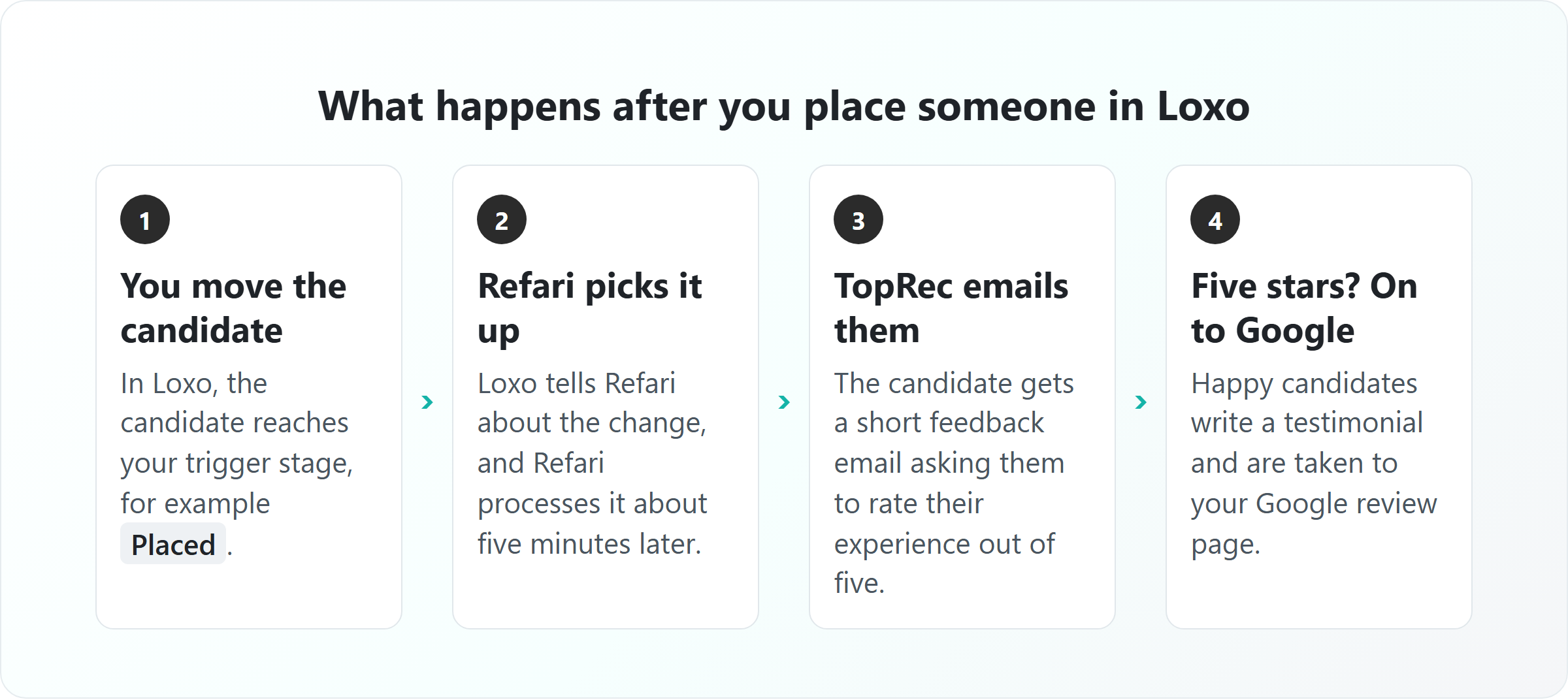
In more detail, this is what happens after a placement:
- You move the candidate to your trigger stage in Loxo.
- Loxo tells Refari about the change. Refari processes it about five minutes later (occasionally up to seven).
- TopRec queues a feedback email to the candidate. Refari times delivery for when the candidate is most likely to open it, so it can arrive later the same day rather than instantly.
- The candidate rates their experience from 1 to 5 stars. A rating of 1 to 4 stars comes to you privately, with any comment they leave.
- A candidate who gives five stars is asked to write a testimonial, then taken to your Google review page to post it.
- If they give five stars but do not write a testimonial, TopRec sends one gentle follow-up two days later.
If the Loxo job has a contact (the hiring manager) with an email address, TopRec can ask them for feedback at the same placement, so you collect reviews from both sides of the hire.
Before you start
- Loxo is connected to Refari. Your Loxo jobs should already be showing on your Refari job board.
- TopRec is switched on for your account. If you cannot see Testimonials > TopRec Settings in your Refari dashboard, contact Refari Support and we will turn it on.
- You are a Company Admin. Company Managers can open TopRec Settings but cannot change them.
- Your Loxo jobs are complete. Each job needs an owner (the recruiter), a company, and the candidate needs an email address. In-house teams can simply use their own organisation as the company.
Step 1: Add your Google review link
TopRec needs to know where your Google review page is. In your Refari dashboard, go to Testimonials > TopRec Settings, find the Social sites for reviews card and paste your link into Google review URL. If you do not have the link yet, Setting up your Google review link for TopRec ↗ shows how to get it from your Google Business Profile, and how to send different recruiters to different profiles if you have more than one office.
Step 2: Choose the Loxo stage that triggers the request
This is where you connect a Loxo stage to TopRec. When you connected Loxo, Refari imported your Loxo workflow stages automatically, so they are already in the list.
- Go to Testimonials > TopRec Settings.
- In the Automation triggers card, press TopRec triggers.
- The dialog lists three TopRec stages: Internal interview, External interview and Placed. Open Placed.
- Tick the Loxo stage (or stages) your team uses when someone has been placed, for example Placed or Hired.
- Press Save.
Note: Choose a stage that means the placement has genuinely happened, not an offer stage. TopRec asks people about something that has already occurred, and a request that arrives before the candidate has accepted can land badly.Idea: The two interview stages are optional. Ticking a Loxo interview stage under Internal interview or External interview asks candidates for a quick star rating after interviews too, which gives you early feedback on the candidate experience. Only the Placed stage leads to testimonials and Google reviews.If you add or rename a stage in Loxo after connecting and it does not appear in this list, contact Refari Support and we will refresh your stages.
Step 3: Turn on TopRec automation
Still in TopRec Settings, find the TopRec automation card. Switch on TopRec automation for candidates, and also TopRec automation for clients if you want hiring managers asked as well. Apply your changes.
Step 4: Send five-star candidates to Google
In the Social sites for reviews card, make Google your Primary site. With Primary set, a candidate who writes a testimonial is taken to your Google review page with their testimonial already copied, so all they have to do is paste it and post.
You can also tick Direct drive. That skips the testimonial step and sends five-star candidates straight to Google after they choose their stars. It is quicker for the candidate, but you do not collect a TopRec testimonial for your own website first. TopRec Primary and Direct Drive settings ↗ walks through both journeys screen by screen.
You're set up: the next time you move a candidate to your trigger stage in Loxo, TopRec will send them a feedback request. Their response appears under Testimonials in your Refari dashboard.Safeguards that stop the wrong people being emailed
Automating review requests only works if candidates are asked at the right moment, and only once. TopRec has several safeguards built in:
- One request per placement. A candidate is asked once for each placement, even if the stage is changed back and forth.
- No repeat asks. A candidate who has left you a verified testimonial recently (within the last six months) is not asked again.
- No late requests for old placements. Loxo sometimes sends Refari updates about a person's older applications when their record changes. If Refari has been unable to bring a placement across for more than seven days, it stops trying, so the candidate is not sent a feedback request long after the event.
- Links expire. The link in each request stops working after 30 days.
Note: The trigger acts on stage changes, so moving a past candidate into your Placed stage today will send them a request today. If you tidy up old records in Loxo, use a different stage for them, or do the tidy-up before you tick the stage in Step 2.Where the reviews end up
- Ratings and testimonials appear under Testimonials in your Refari dashboard, credited to the recruiter who owns the Loxo job.
- Testimonials you approve can be shown on your website with the Refari testimonials widget, and shared to your social channels.
- Google reviews are posted by the candidate on your Google Business Profile, where anyone searching for you will see them.
You can also put your best Google reviews on your own site. Which Google reviews appear on your website ↗ explains how Refari chooses and publishes them.
Why didn't a candidate get a review request?
If a placed candidate was not emailed, check these in order:
- The Loxo stage you moved them to is not ticked under Placed in TopRec triggers.
- TopRec automation for candidates is switched off.
- The Loxo job has no owner or no company, or the candidate has no email address in Loxo.
- The candidate left you a verified testimonial in the last six months.
- The recruiter on the job is inactive in Refari, or the candidate is linked to more than one recruiter in Refari.
- The email simply has not arrived yet: delivery is timed for the candidate, so allow until later in the day.
If none of these explain it, contact Refari Support with the candidate's name and the Loxo job, and we will trace it.
Frequently asked questions
Does the candidate have to apply through Refari?
No. Any candidate on a Loxo job who reaches your trigger stage can be asked, including people you sourced yourself in Loxo. Refari brings the application across from Loxo when it reaches the stage.
How soon after the placement is the request sent?
Refari picks up the stage change about five minutes after you make it in Loxo. The email is then delivered at the time the candidate is most likely to open it, which is usually the same day.
Can hiring managers leave a review too?
Yes. Switch on TopRec automation for clients, and make sure the Loxo job has a contact with an email address. That contact is asked for feedback when the candidate is placed.
Will this email candidates I placed months ago?
Ticking a stage does not send requests to everyone already sitting in it: requests follow stage changes. The safeguards above also stop late requests for placements that have been stuck for more than seven days. If a request ever reaches someone you placed long ago, tell Refari Support so we can look at that record.
Can I send reviews to more than one Google profile?
Yes. If you have several offices or brands, you can give each recruiter their own Google review link in the Social sites for reviews card.
Final Notes
Asking every placed candidate for a review, every time, is the single biggest lever for a strong Google rating, and it is the step busy teams most often forget. Applications, registrations and referrals from your Refari job board flow into Loxo as well, and How Refari applications, registrations and referrals appear in Loxo ↗ explains exactly where they land.
Refari is a recruitment marketing platform for recruitment agencies and in-house talent teams: job boards and widgets for your website, job alerts, candidate referrals, TopRec reviews and job distribution, all connected to your ATS. New to Refari? Book a demo at refari.co. Already a customer? Contact Refari Support and we will help you switch TopRec on.
Other articles you might be interested in: How to connect Loxo to Refari | TopRec setup checklist | What TopRec communications are sent and when?
Was this article helpful?
That’s Great!
Thank you for your feedback
Sorry! We couldn't be helpful
Thank you for your feedback
Feedback sent
We appreciate your effort and will try to fix the article