This article explains how to get your jobs on Jora automatically. You do not need to post each role to Jora by hand: Refari builds a Jora XML feed of your live jobs, you send the link to Jora once, and from then on Jora collects your new, changed and closed jobs from that feed by itself. Jora says this feed integration is free.

What is Jora?
Jora is a job search site used heavily in Australia, and it also runs job search sites in a number of other countries. It is a job aggregator: rather than only showing ads written on Jora, it collects jobs from employers' and recruiters' own websites and feeds and lists them in one place, then sends interested candidates back to the original job to apply.
An XML feed is a machine-readable list of your live jobs at a fixed web address. Refari keeps that list up to date for you, so whatever is on your Refari job board (the careers board on your website, open to anyone) is what Jora sees.
Why a Jora job feed beats posting jobs one by one
- No double handling. Your recruiters post a job once, in your ATS or in Refari, and it reaches Jora without anyone logging in to Jora.
- Closed jobs come down by themselves. When a job expires on your job board it leaves the feed, and Jora removes jobs once they are no longer in the feed.
- Applications stay yours. Jora sends candidates to the job on your own job board to apply, so the application lands with you, not in a separate inbox.
- It is the route Jora prefers. Jora's own guidance says a feed is a more reliable and faster way to get jobs published than having Jora crawl a website.
How to get your jobs on Jora
Setting up takes three steps, and the second one happens on Jora's side rather than in Refari.
Step 1: Copy your Jora feed link from Refari
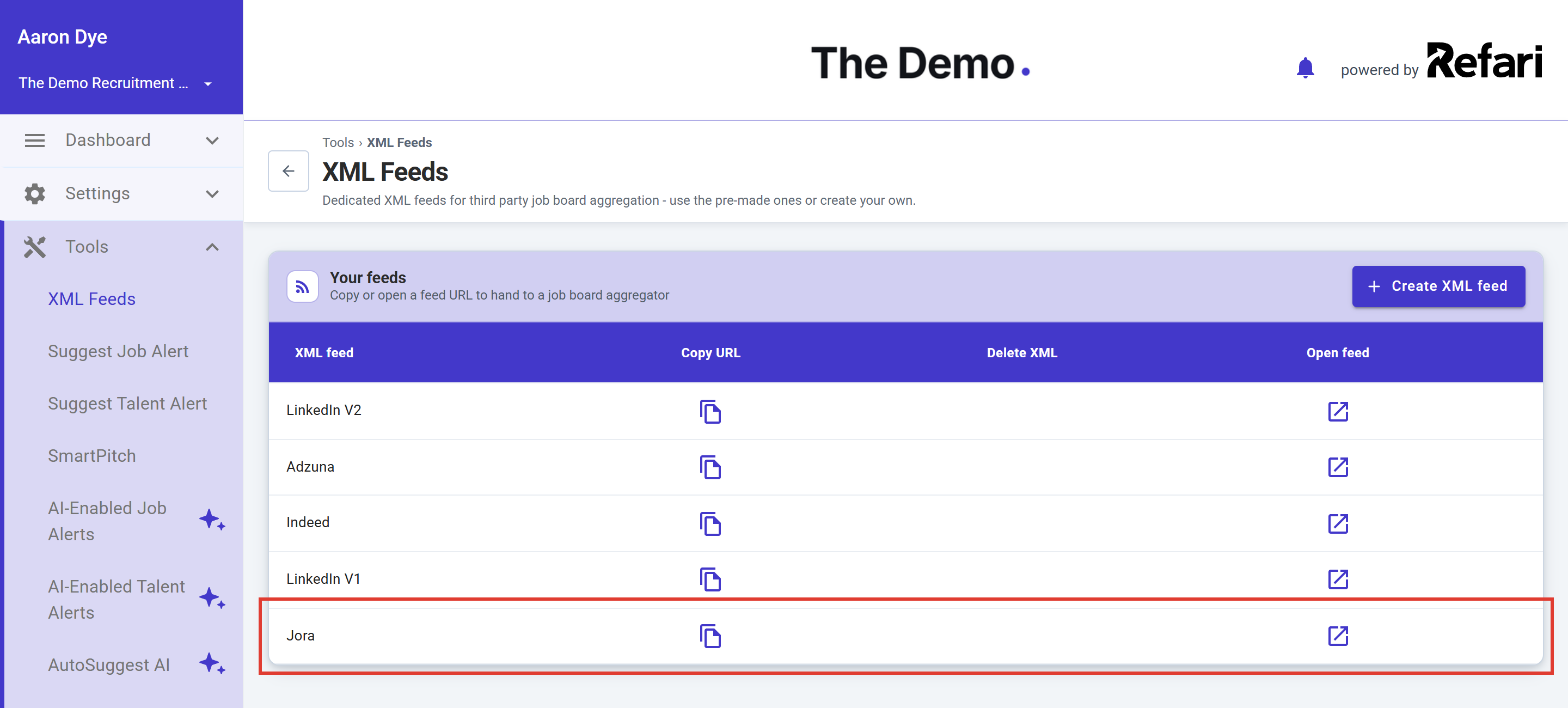
- In your Refari dashboard, go to Tools > XML Feeds. You need to be a Company Admin or Company Manager to see this page.
- Find the Jora row. Refari creates this feed for every account, so there is nothing to switch on.
- Click the Copy URL icon in that row to copy the feed link. You can also click Open feed to look at the feed in your browser and check your jobs are in it.
Note: Use the feed called Jora, not one of the other aggregator feeds. Each feed is laid out in the format its job board expects, so the Indeed or LinkedIn feed is not a substitute.Step 2: Send the feed link to Jora
Jora sets up each feed by hand, so you ask them to take it. Use the Jora enquiry form. Choose the option that best matches a job feed or job posting enquiry, and paste in your feed link. Something like this works well:
Hi Jora,

We are a recruitment team and would like the jobs from our website job board listed on Jora. Please could you set up this XML feed, which lists our live jobs and is updated automatically:

<paste your Jora feed link here>

Our job board is at <your careers page address>.

Many thanks
Step 3: Wait for Jora to set up the feed
Jora reviews the feed and the jobs in it, then starts collecting from it. How long that review takes is up to Jora. Once it is running, there is nothing more to do: every job on your Refari job board that is included in the Jora feed will flow through.
Success: You are set up when you search Jora for one of your job titles and location and see your role, with the apply link taking you to that job on your own job board.What Jora needs from each job
Jora publishes a feed specification that sets out what it relies on. Refari fills these in from each job automatically. The table shows where each one comes from, so you know what to keep tidy in your ATS or in Refari.
| What Jora reads | Where Refari takes it from | Why it matters |
|---|---|---|
| Job title | The job's title | Jora asks for a real job title, ideally without location, salary or reference numbers in it. |
| Description | The advert text, with its formatting | Jora wants the description formatted (paragraphs and lists), which Refari passes through. |
| Location | The job's location, plus city, state, postcode and country where the job has a detailed address | Jora maps each job to a place. A vague or missing location makes the job hard to find, or stops it being published. |
| Job type | The job's work type, for example Full time or Contract | Without it, the job drops out of searches filtered by job type. |
| Salary | The salary range, only when the salary is set to show | Optional. For Australian jobs with no salary, Jora says it estimates one. |
| Closing date | The job's expiry date | Jora does not publish jobs whose closing date has passed. |
| Job link | The job's page on your Refari job board | This is where Jora sends candidates to read the full ad and apply. |
Note: Jora also has content rules: each job needs a clear location, title, working hours and closing date, and it must be a genuine, current paid role. Jora says it does not publish permanently open positions, so an always-open "register your interest" advert may not appear on Jora even though it shows on your job board.How quickly jobs appear and disappear on Jora
Two systems are involved: Refari updating the feed, and Jora collecting it.
| What happens | How long it takes |
|---|---|
| A job is added, changed or expired on your Refari job board | Refari updates the Jora feed within about 15 minutes. Changes made close together are grouped into one update. |
| Jora collects the updated feed | Jora says it collects feeds on a set schedule, somewhere between every 2 hours and every 24 hours, depending on how many jobs you have and how often they change. |
| A job leaves the feed | Jora removes it on its next collection. Jora also takes jobs down when their closing date passes. |
| A job has no closing date | Jora says it expires those jobs 60 days after they were posted. |
If your jobs come from an ATS, add the time it takes for a change in your ATS to reach Refari. The article on removing and expiring job adverts ↗ explains how expiry flows from your ATS.
Where Jora applicants go
Every job in the feed links to that job on your Refari job board. A candidate who clicks through from Jora reads the full advert on your website and applies there, so the application follows the same path as any other application on your job board, including into your ATS if you have one connected.
Each feed link carries a tag that tells Refari the visit came from your Jora feed, so Jora shows up as its own source in your Refari reporting rather than being lumped in with general website traffic.
Choosing which jobs go to Jora
By default, every public, live job on your job board is included in the Jora feed. If there is a role you want on your own website but not on Jora, for example a confidential search, you can switch the Jora feed off for that job. The guide to Manage Job Distribution to XML Feeds ↗ shows you how, job by job.
Jora is one of several aggregators. If you also want your roles on Indeed, the steps are similar, and the guide to getting your jobs aggregated by Indeed ↗ walks you through it.
Frequently asked questions
How do I post jobs on Jora?
You can post a single ad on Jora directly, but for a recruitment team with a steady flow of roles the better route is a job feed. Copy your Jora feed link from Tools > XML Feeds in Refari and send it to Jora once. After that, Jora collects your jobs automatically.
Does it cost anything to get our jobs on Jora?
Jora says its feed integration is free. The Jora feed is already part of your Refari account. If you want to pay to promote jobs on Jora, that is arranged with Jora directly.
A job is on our job board but not on Jora. Why?
Check four things: the job has not been excluded from the Jora feed in Manage Job Distribution; it has a clear location and an expiry date in the future; it is a genuine, current role rather than an always-open advert; and Jora has had time to collect the feed since the job went live. If all four look right, contact Jora with the job title and your feed link.
Do Jora jobs show in Google for Jobs?
Google can list jobs it finds on job sites like Jora, but the listing and the click then go to Jora. The dependable way to appear under your own name is a Refari website, which includes Google for Jobs. The Google for Jobs checklist ↗ covers what Google needs and how to check it.
New to Refari?
Refari gives recruitment teams a job board and careers website that connects to their ATS, with job alerts, referrals and automatic feeds to job sites such as Jora, Indeed and LinkedIn. To see it with your own jobs, book a demo at refari.co.
Final Notes
Once Jora is collecting your feed, keep your job titles, locations, work types and expiry dates tidy at the source and Jora will stay in step with your job board. If you cannot find the Jora feed in Tools > XML Feeds, or the feed opens without your jobs in it, contact Refari support and we will look into it.
Other articles you might be interested in: How to get your Job Adverts aggregated by Indeed | Manage Job Distribution to XML Feeds | Why your jobs aren't showing in Google for Jobs
Was this article helpful?
That’s Great!
Thank you for your feedback
Sorry! We couldn't be helpful
Thank you for your feedback
Feedback sent
We appreciate your effort and will try to fix the article