To get your Loxo jobs into Indeed and Jora, connect Loxo to Refari once. From then on, every job you publish in Loxo appears on a job board on your own website and is included in ready-made job feeds (XML feeds) that Indeed, Jora and other job search engines collect automatically. With a Refari website, each job is also set up for Google for Jobs. Applications, registrations and referrals made through your site go straight back into Loxo.
This guide explains what that gives you alongside the job posting you may already do from Loxo, then walks you through the three steps to set it up.
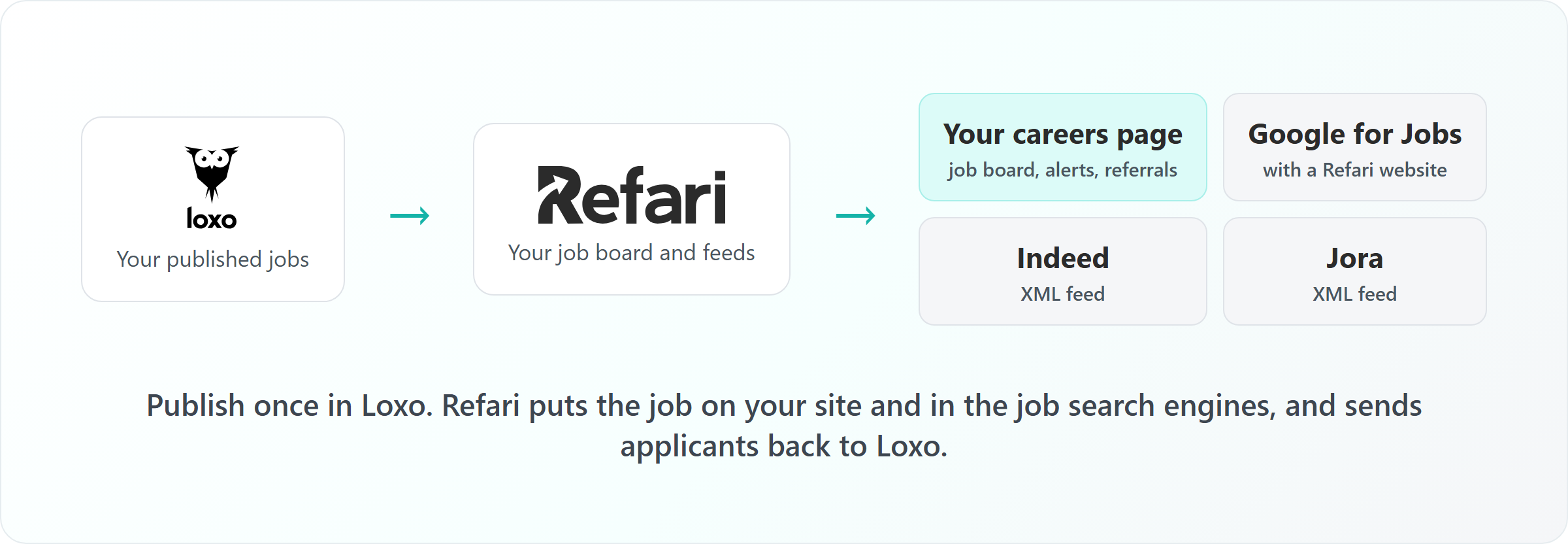
Your Loxo jobs, your careers page and the job search engines
Loxo is the recruitment platform (applicant tracking system, or ATS) where you manage your jobs and candidates. If you already post paid adverts to job boards from Loxo or through a multiposter, keep doing that: a paid advert is the right tool when a role needs a push on a particular board. Refari covers a different set of channels, the ones that bring candidates to your own website:
| Where the job appears | How it gets there | Where the candidate applies |
|---|---|---|
| Your careers page | The Refari job board on your website, filled automatically from Loxo | On your website. The application goes into Loxo |
| Google for Jobs | Included with a Refari website: every job gets its own page that Google reads | On your website, via the job page Google links to |
| Indeed, Jora, Adzuna and LinkedIn | A job feed per site, built and kept up to date by Refari | On your website, via the link in the feed |
| Candidates who asked to hear about roles | Refari job alerts, emailed when a matching job goes live | On your website |
| Your network's contacts | Refer a Friend on each job, so people can recommend someone they know | The referral goes into Loxo |
A job alert is a saved search: a candidate tells you the kind of role they want, and Refari emails them when a matching job goes live. A referral is a recommendation, where someone tells you about a person who could suit one of your roles.
Note: Feeds are not paid adverts. Indeed and Jora decide how and where to show jobs collected from a feed, and Indeed's free collection from feeds is not available in every location. If a role needs guaranteed reach on a particular site, a paid advert is still the way to get it.How to set it up in three steps
Step 1: Connect Loxo to Refari
Refari Support sends you a connection link. You create an API key in Loxo (a secure key that lets Refari read your jobs and write candidates back) and paste it into the link. Refari then sets up everything it needs inside Loxo for you, imports your recruiters and brings across your published jobs. Changes you make to a job in Loxo reach Refari almost straight away.
Every step, and exactly what syncs, is covered in How to connect Loxo to Refari: setup, what syncs and when ↗.
Step 2: Add the job board to your careers page
Your job board is a Refari widget, a small piece of code your web developer pastes into your careers page once. It sits directly on your page rather than in a frame, and it keeps itself up to date from then on, so nobody needs to edit the website when a role opens or closes. Job alert sign-up and Refer a Friend buttons come with it.
Installing it on WordPress, Webflow or Squarespace is explained in How to add Loxo jobs to your WordPress, Webflow or Squarespace site without an iframe ↗.
Step 3: Send your feeds to Indeed and Jora
Refari builds a job feed for each major job search engine as soon as you have jobs on your board. A job feed (often called an XML feed) is a machine-readable list of all your live roles, which the job site collects automatically, so you never post a job to them one by one. In your Refari dashboard, go to Tools > XML Feeds and copy the link for the site you want.
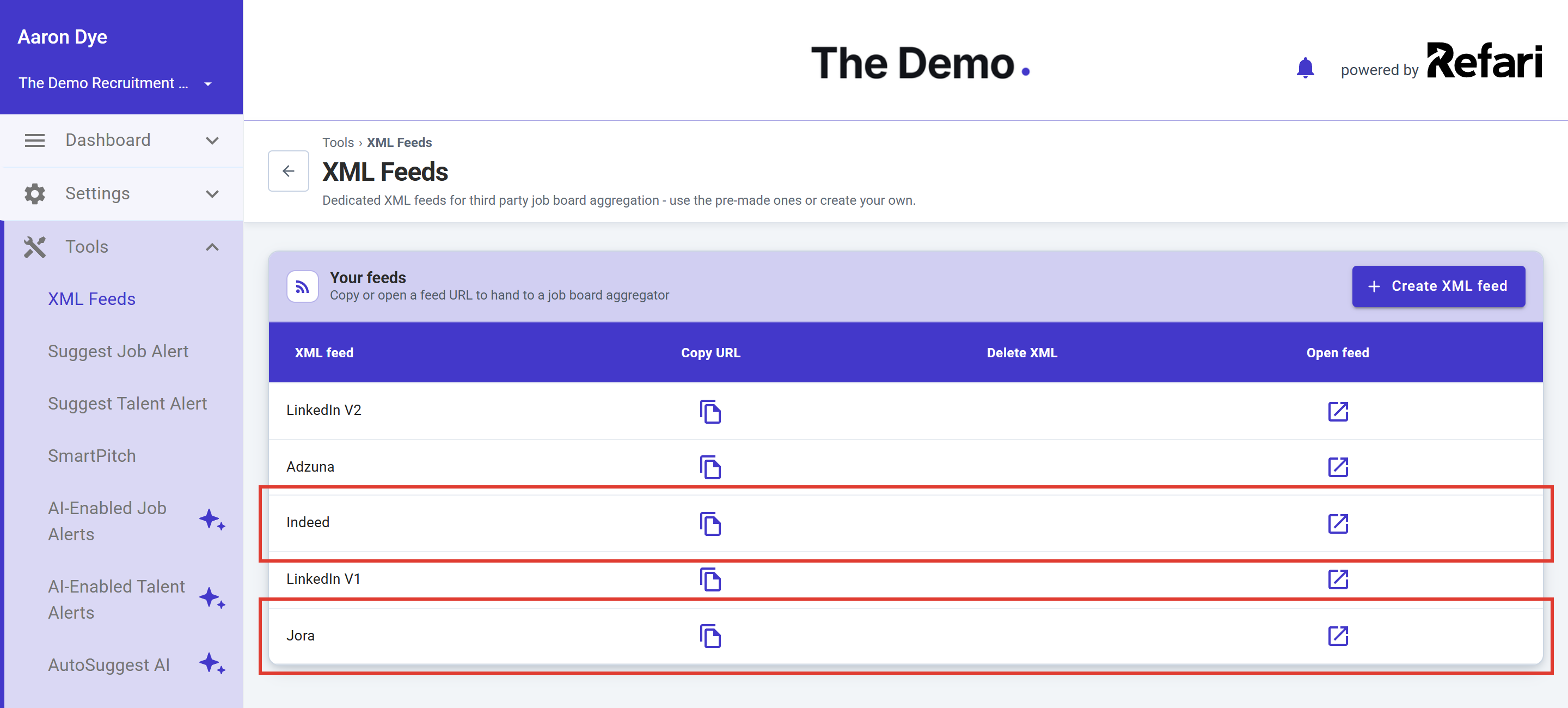
- Indeed: send Indeed your Indeed feed link and ask them to collect it. The short email to send is in How to get your Job Adverts aggregated by Indeed ↗.
- Jora: Jora is a job search site widely used in Australia and New Zealand. Getting your Jora feed accepted is covered step by step in How to get your jobs on Jora automatically ↗.
You are set up. From now on, publishing a job in Loxo puts it on your careers page and into your feeds, and closing or unpublishing it takes it off everywhere. Refari rebuilds your feeds within about 15 minutes of a change. Job sites collect feeds on their own schedule, so allow longer for a change to show on Indeed or Jora.How your Loxo jobs get into Google for Jobs
Google for Jobs is the jobs panel Google shows at the top of searches such as "accountant jobs in Brisbane". There is no feed to send and no fee. Google builds the panel from job information it finds on websites, written in a standard format called JobPosting structured data: the title, location, work type, salary, dates and description, set out so a machine can read them.
Google for Jobs comes with a Refari website. When Refari builds your website, every Loxo job gets its own fast-loading page with structured data checked against Google's rules, and new job pages are reported to Google directly. A job board widget on a website you manage yourself shows your jobs and feeds job sites, but Google for Jobs is not part of it. To add it, ask us about a Refari website at refari.co ↗. Google still decides when it visits and what it shows, so a new role usually takes some time to appear.
If your roles are not showing in Google for Jobs, the common reasons and how to test a job page are in Why your jobs aren’t showing in Google for Jobs: a checklist for recruiters ↗.
What your Loxo jobs need to reach the feeds
A Loxo job reaches your Refari job board, and from there your feeds and Google for Jobs, only when it is published and its status is Active. It also needs an owner (the recruiter shown on the advert), a category, a job type and a location. Fill in the address on the job (city, state, postcode and country) rather than leaving it blank: that address becomes the job's location in your feeds, and Indeed, Jora and Google all rely on an accurate location to show the job to the right people.
If a job you expected is missing, Why a Loxo job isn’t showing on your Refari job board ↗ walks through every check.
Choosing which jobs go where
- Confidential roles stay off everything. A job you do not publish in Loxo never reaches Refari, so it never appears on your website or in any feed.
- Keep a job on your site but out of a feed. In Refari, open the job and use Manage Job Distribution to untick the feeds it should not be in. The steps are in Manage Job Distribution to XML Feeds ↗.
Frequently asked questions
Does Loxo have a job feed for Indeed and Jora?
Refari provides one for you. Once Loxo is connected, Refari keeps a feed for Indeed, Jora, Adzuna and LinkedIn up to date with your published Loxo jobs. You copy each link from Tools > XML Feeds and give it to that site once.
Do I still need to post jobs from Loxo?
Keep using Loxo or your multiposter for paid adverts. Refari covers your own careers page, Google for Jobs (with a Refari website), free job feeds such as Indeed and Jora, job alerts and referrals. The two work side by side.
Where do applicants from Indeed and Jora end up?
Each job in the feed links to that job on your own website, so candidates apply there, and the application goes into Loxo with the CV attached. Refari records which feed each applicant came from.
Will my Loxo jobs appear on Google for Jobs straight away?
If Refari builds your website, each job gets its own page with the information Google needs as soon as it is on your board, but Google decides when to visit and what to show. Allow some time for a new role, and use the Google for Jobs checklist linked above if one does not appear.
Final Notes
Once Loxo is connected, the job board and the feeds look after themselves: you publish and close jobs in Loxo exactly as you do today. Existing Refari customers can raise a ticket through support.refari.co for help with any step.
Refari is the job board, careers website and candidate attraction platform used by recruitment agencies and in-house talent teams, with job alerts, referrals, testimonials and job feeds built in. If you use Loxo and would like to see your own jobs on a Refari job board, book a demo at refari.co.
Other articles you might be interested in: How to connect Loxo to Refari: setup, what syncs and when | How to get your jobs on Jora automatically | How to get your Job Adverts aggregated by Indeed
Was this article helpful?
That’s Great!
Thank you for your feedback
Sorry! We couldn't be helpful
Thank you for your feedback
Feedback sent
We appreciate your effort and will try to fix the article